Factor8 logoFactor8

CONSTELLATIONS SEQUENCER

Our flagship sequencer. No matter the parameters, it always delivers

CONSTELLATIONS SEQUENCER

Constellations Sequencer is an audio plugin that generates rhythmic patterns via Euclidean algorithms, dual-layer polyphonic channels, parametric modulation, and intelligent harmony engines in a streamlined focus-plus-context interface.

€10.00Buy Now

Features

A quick walkthrough of every tab. The full annotated manual ships with the plugin.

Core concepts

Dual-layer per channel

Every channel runs two Euclidean layers in parallel. Their step patterns are OR-merged — a hit on either layer produces a MIDI note, creating denser, more complex rhythms than a single layer.

Concatenated A + B

Each layer splits into two sub-sequences (A then B) whose step counts add up to the channel's total Steps. The A/B ratio knob controls the split, and each sub-sequence has its own fill percentage — asymmetric phrases impossible with a plain Euclidean circle.

Host-synced, sample-accurate

No internal free-running clock. Play, stop, song position, tempo and swing all follow the DAW exactly. MIDI timestamps are calculated to the sample.

Modulation system

Velocity, Duration, Notes, Contour, Polyphony and Strum share one LFO architecture: four depth faders, four morphable wave-shape knobs, a phase offset, and an Intensity / Min / Max / Rate macro panel. The resulting curve is drawn live.

Randomize with drag amount

Every tab has one or two dice buttons. Click for a gentle randomize; click and drag vertically to increase the randomization strength. The further you drag, the more values deviate from their current settings.

Wave shapes (0 → 3)

The small rotary knobs under each depth fader morph through four waveforms: 0 = sine, 1 = triangle, 2 = square, 3 = saw. Values between integers blend adjacent shapes.

Main window at a glance

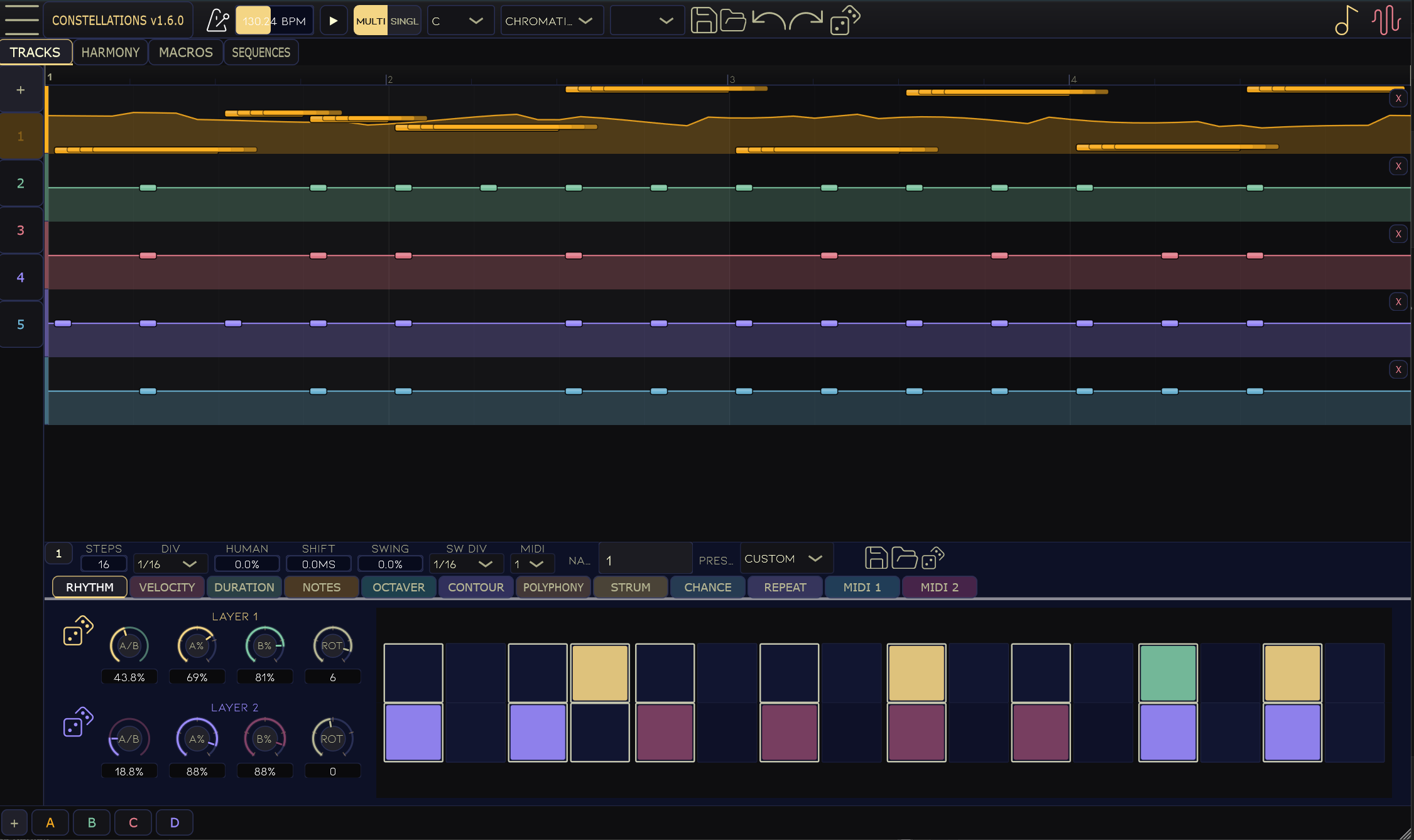
The window is divided into three zones: the transport bar (top), the Tracks / Harmony viewer (middle), and the detail panel for the selected channel (bottom).

Main window at a glance
  • Transport bar — BPM, play/stop, swing, key/scale, global presets, undo/redo, randomize all, overlay toggles.
  • Tracks tab — timeline view with 16 channel lanes; click a tile to edit it below.
  • Harmony tab — constellation-wheel view for harmonic relationships between tracks.
  • Detail panel — nine sub-tabs (Rhythm · Velocity · Duration · Notes · Contour · Polyphony · Strum · Chance · Repeat) shape every aspect of the output.
Single-track vs Multi-track view

A pill switch in the transport bar toggles between two layouts. Multi (default) shows up to 8 track lanes for composing full arrangements; Single collapses the list into one expanded lane for focused step-by-step programming.

Single-track vs Multi-track view

Rhythm tab — the Euclidean engine

The heart of every channel. Four knobs per layer define the two concatenated Euclidean sub-patterns; the merged result is shown on the right-hand step grid.

Rhythm tab — the Euclidean engine
  • A/B ratio — how many steps belong to A vs B (0% = all A, 100% = all B).
  • A-Fill % / B-Fill % — density (hits) in each sub-sequence, 0–100%.
  • Rotation — rotates the concatenated pattern by N steps (0 to Steps−1).
  • Layer 2 — same controls, independent values (magenta accent), OR-merged with Layer 1.

Velocity

Four depth faders (1/2, 1/4, 1/6, 1/8 rate) and four morphable wave-shape knobs drive a live velocity curve. Intensity, Min (0–127), Max (0–127), and Rate macros on the right panel scale the output. A Min/Max link keeps the range width fixed when dragging.

Velocity

Duration

Min/Max are expressed in beats (0.05–32 bt) and control how long each MIDI note is held. When Legato is enabled, notes extend continuously until the next note triggers instead of using fixed duration values.

Duration

Notes

Min/Max are pitch names (e.g. C3, D#4). Output is snapped to the global Key/Scale. The base pitch from the Rhythm tab is offset by this LFO.

Notes

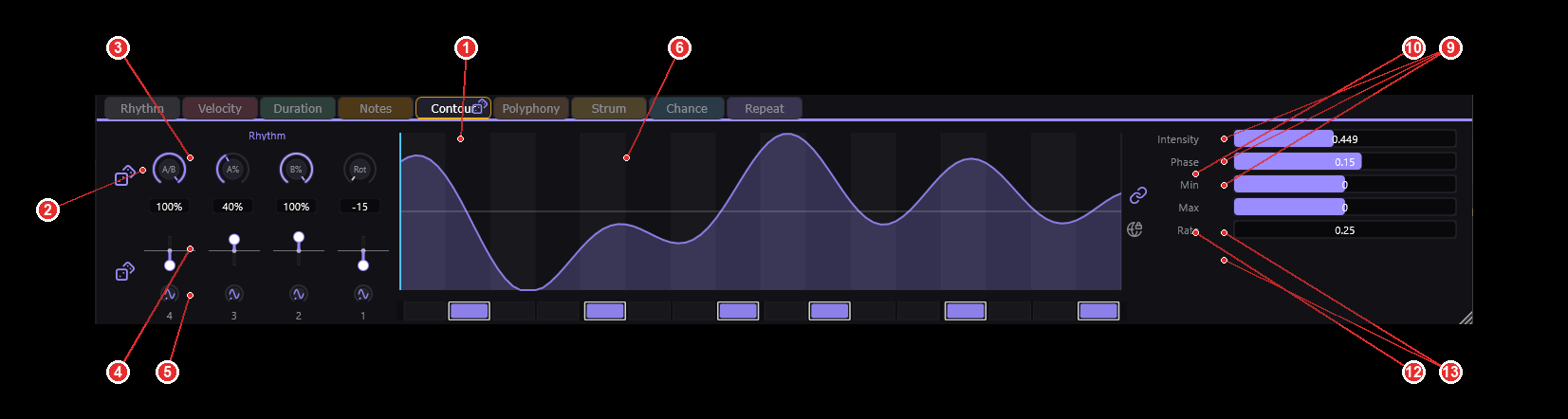
Contour

Macro-level shape applied across the pattern. Min/Max range is −24…+24 semitones. The Res field sets how many steps the contour is quantised to (1–64).

Contour

Polyphony

Min/Max are chord voicings (e.g. Root, Major, Dom13). Steps can output a single note or expand into a chord. 21 voicings available.

Polyphony

Strum

Min/Max are in milliseconds (0–50 ms min, 0–2000 ms max). Offsets chord notes in time so voicings arpeggiate instead of stacking instantly. Only Intensity and Rate are exposed on the right panel.

Strum

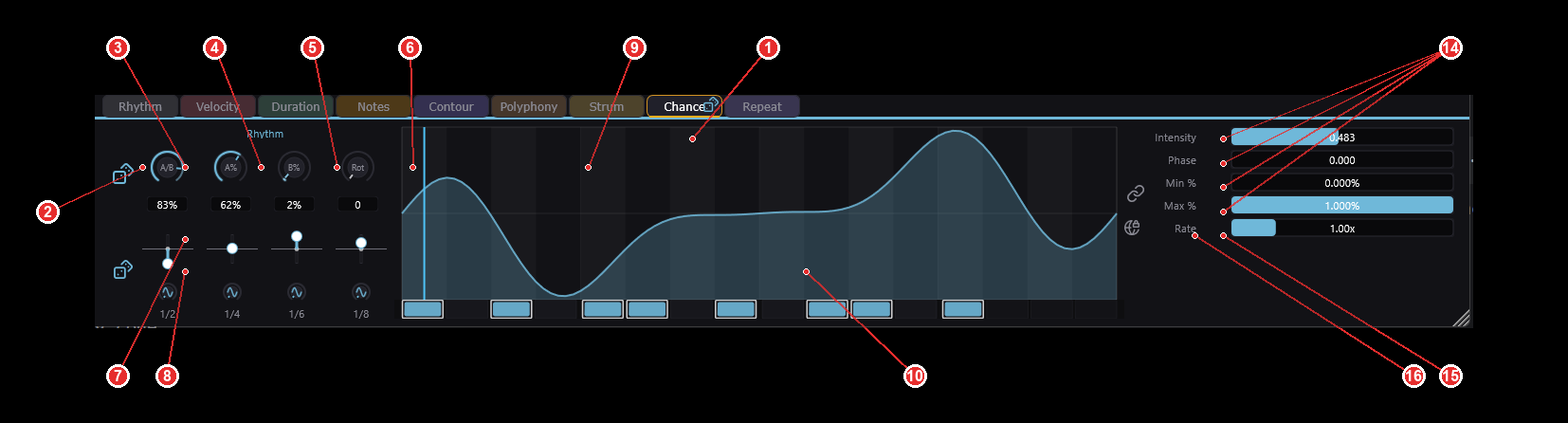
Chance tab

Probability gate per step. Uses the Rhythm knob layout as the modulation source and exposes per-step probability pads. A step only fires if it passes the probability test.

Chance tab
  • Per-step chance pads — click to force a step to always fire (100%) or never fire (0%), overriding the curve.
  • Intensity scales overall probability; Min % / Max % set floor and ceiling.
  • Phase offsets the probability pattern; Rate controls how fast it cycles.

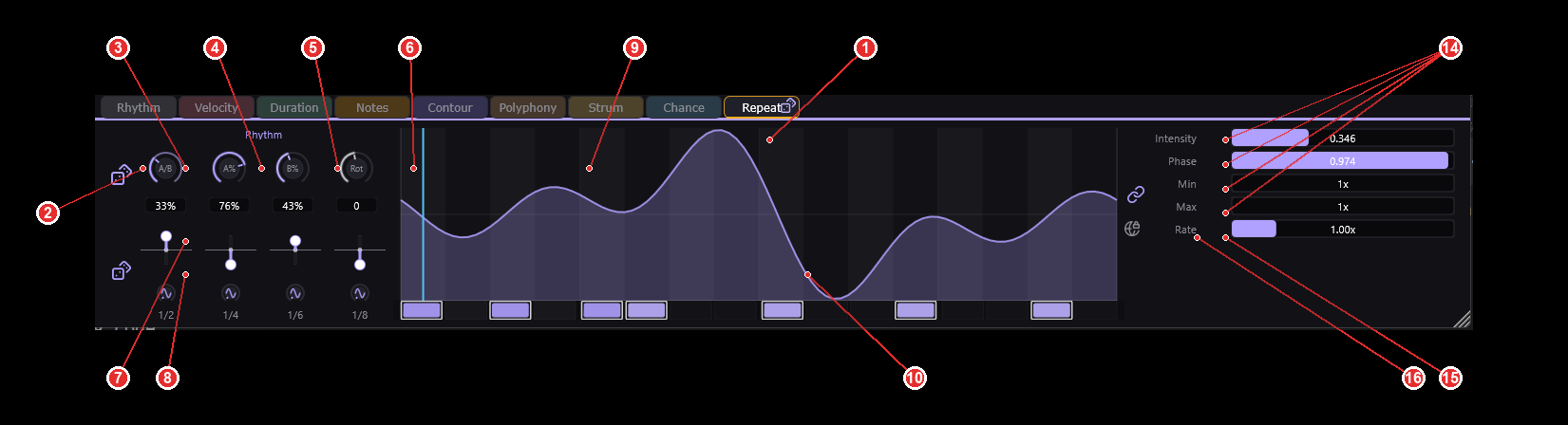
Repeat tab

Turns a single step into a ratchet / roll (also called "burst" or "flam"). Same layout as Chance, but Min/Max are expressed as a repeat multiplier (e.g. 3× = triplet roll within one step).

Repeat tab

Harmony — Constellations view

Switches the main panel to a grid of constellation wheels — one row per layer, four wheels per row (Ratio · A-Fill · B-Fill · Rotation). Each wheel positions the tracks around a ring according to a selected harmonic mode, letting you create harmonically-related polyrhythms between tracks without manually typing numbers.

Harmony — Constellations view

Changelog

v1.5.4

2026-07-27

Added

  • Added 10 global harmony macro parameters (8 per-axis + 2 per-layer rotation) that can be MIDI-mapped as single controls instead of mapping all underlying per-channel parameters
  • Added per-layer rotation knob in the Harmony tab that rotates all four axes of all active channels simultaneously via a single macro parameter
  • Added right-click exclusion on harmony circle dots — right-clicking a dot removes it from the constellation shape and group rotation while keeping it individually draggable; right-click again to restore it

Changed

  • Harmony center knob now writes to individual per-channel parameters directly, preserving per-track positional differences after rotation
  • Harmony circle visual update rate increased from 10fps to 60fps for smoother visual feedback during parameter automation

Fixed

  • Fixed harmony circle dots not moving when their parameters are changed via MIDI mapping or DAW automation — the circles now visually update to reflect externally-driven parameter changes
  • Fixed center constellation knobs in the Harmony tab being unresponsive to drag — rotation values are now correctly written and read back, and the knob works even with a single active track
  • Fixed layer rotation knob causing dots to jump back to their original position on release — visual updates now stay in sync with engine values throughout the drag
  • Fixed layer rotation knob sending exponentially accumulating values during drag, causing erratic behavior — the macro value is now set directly from the drag start position plus accumulated angle
  • Fixed layer rotation knob jumping on the first drag event due to a stale delta baseline from a previous drag session
  • Fixed non-rotation harmony parameters (ratio, A-fill, B-fill) being stuck at the bottom of the circle during layer rotation — percentage values are now correctly converted to step-units before parity-circle snapping
  • Fixed continuous MIDI automation of the layer rotation macro producing no visible changes — sub-threshold deltas now accumulate until they cross a parity-circle snapping threshold
  • Fixed detail panel Rhythm tab being unresponsive on first click after reopening the plugin — the tab bar now stays in sync with the active tab when it is restored from saved state
  • Fixed intermittent note shifting during playback — step boundaries landing exactly at audio block edges were silently skipped, permanently shifting all subsequent notes
  • Fixed chance modulation causing timing jumps when skipping step 0 — the skipped step counter now wraps correctly instead of resetting to an invalid state
  • Fixed crash or garbled notes when using polyphony levels 3-5 (Power chord, Sus2, Sus4) — these chord types now produce the correct number of notes instead of reading invalid data
  • Fixed flam/repeat hits firing at wrong intervals when using time divisions other than 1/16 — repeat timing now respects the channel's actual step duration
  • Fixed solo key (S) muting the selected channel instead of soloing it — pressing S now mutes all other channels, pressing S again restores them
  • Fixed potential audio dropouts when DAW automation changes parameters during playback — parameter updates no longer block the audio thread
  • Fixed modulation patterns (contour, velocity, duration, etc.) carrying stale state when the host changes sample rate without stopping transport
  • Fixed harmony arrangement dropdowns (Split Complementary, Triadic, etc.) not producing the correct dot distribution — tracks now correctly stack at their canonical arrangement positions instead of spreading to unrelated locations
  • Fixed Rate slider in the Chance and Repeat tabs having no visible effect — the waveform playhead now moves at the correct speed based on the rate setting, matching the behavior of all other modulation tabs